case-study

ATN Script — Automating Computer Tasks with Script Learning

Avatar

Admin

Published date: 25/09/2025 Updated date: 02/04/2026

Share on

ATN Script uses AI to learn and replay your tasks: invoices, emails, reporting, admin workflows. Automate repetitive work with secure, GDPR-ready AI.

Table of contents

Show
ATN Admin Suite · Process Automation
ATN Script: The Automation Engine Behind ATN Admin
Within the ATN Admin family developed by DFM-Europe, ATN Script plays a central role. It provides the technical foundation for automating repetitive computer tasks through simple, reusable scripts. Where an employee would normally perform hundreds of clicks, copy-and-paste actions, or manual searches, ATN Script observes, learns, and reproduces those steps automatically.
Solution Family: ATN Admin
Role: Technical foundation for task automation across administrative and back-office processes
Core Capability: Learns repetitive workflows by observing user actions and converting them into reusable scripts
Main Benefits: Time savings, fewer errors, faster deployment, and greater data reliability
How does it work?
ATN Script is based on script-learning technology. The assistant observes a user performing a task such as logging into a website, downloading an invoice, renaming and organizing a file, or entering data. It records each step and transforms the sequence into a reusable and customizable script.
• The assistant observes the user performing a task.
• It records every action in sequence.
• It converts the sequence into a reusable script.
• The script can then be replayed as often as needed with the appropriate parameters, such as username, password, billing period, or customer name.
In practice: ATN Script acts like a virtual employee. It watches how you work, learns your actions, and repeats them quickly, accurately, and on demand.
ATN Script therefore becomes the building block for many other solutions in the ATN Admin suite, including document management, automated invoice collection, email sorting, HR surveys, and internal support workflows.
A real-world example: automatic invoice retrieval
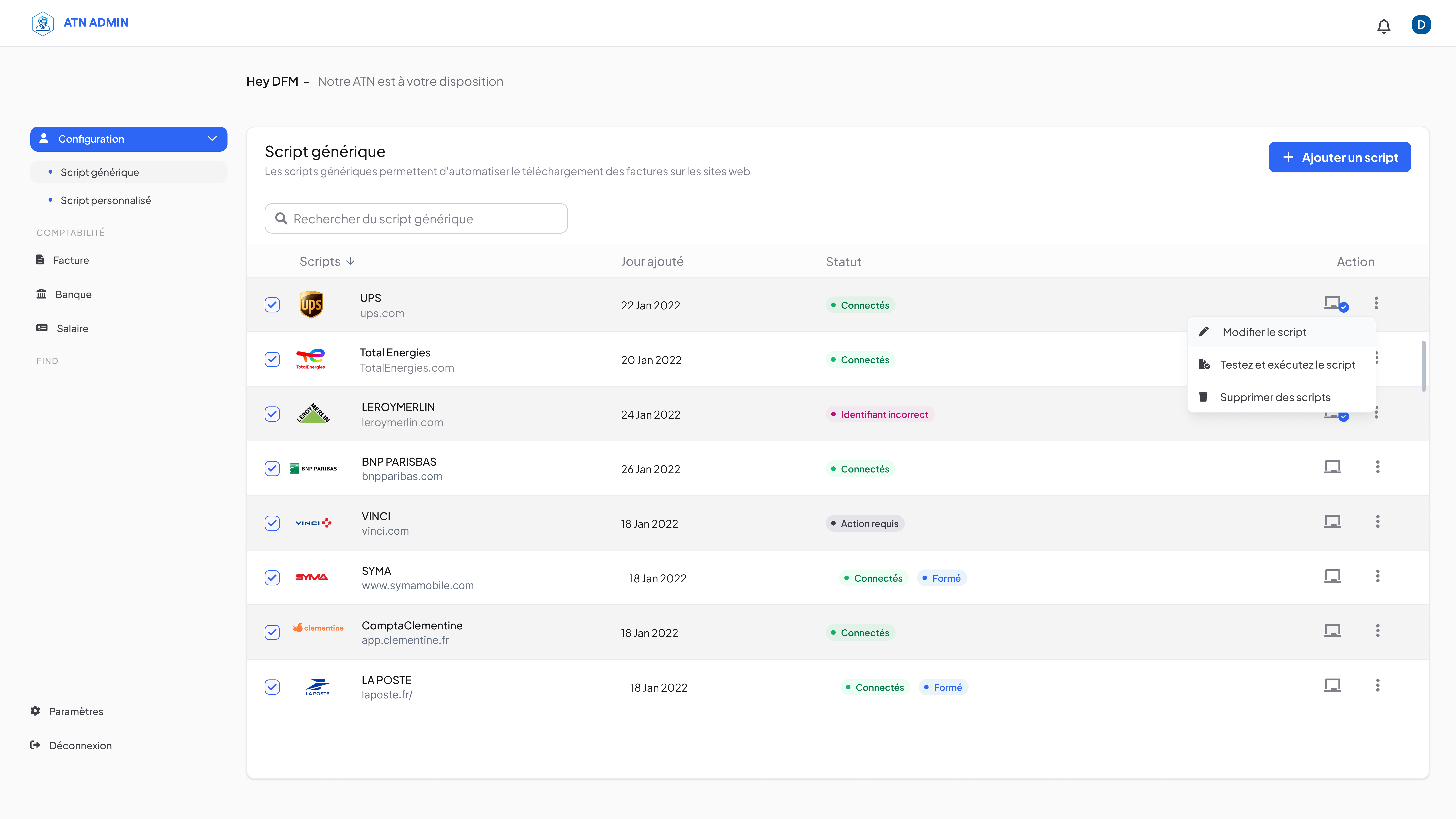
In France, most suppliers make invoices available through secure online portals. For an accounting department, this usually means logging into each site, entering credentials, locating the invoice, downloading it, renaming it, and filing it correctly. By the end of the month, this repetitive process represents hours of work and creates a risk of errors or oversight.
With ATN Script, the process changes:
• First, the invoice retrieval workflow is recorded on a supplier portal.
• The system converts that workflow into an automated script.
• Each time it runs, ATN Script logs in, downloads the invoice, applies the naming rules, and stores the file directly in the designated folder or ERP system.
Result: What used to take hours can now be completed in just a few minutes.
Benefits for the company
For end users
• Immediate time savings by eliminating repetitive tasks.
• Fewer human errors, with fewer oversights and fewer misfiled documents.
• Greater ease of use thanks to an intuitive tool that learns by observing.
For technical and IT teams
• No need to code every complex integration from scratch; observation is enough.
• Modular and reusable scripts that can be combined to automate more complex workflows.
• Fast, scalable implementation without major changes to the existing system landscape.
For executive leadership
• Reduced operational costs.
• Improved data reliability and traceability.
• A concrete step toward the digitization and modernization of internal processes.
A versatile tool—beyond invoices
ATN Script is not limited to accounting. It supports a wide range of use cases across administrative and operational functions:
• Email management: automatically sort emails, save attachments, and file them in the correct folder.
• Calendar updates: automate the creation and modification of recurring events.
• Reporting: extract data from multiple systems, compile it into an Excel file, and send it by email.
• Inventory tracking: connect to supplier portals and check availability.
• HR processes: prepare onboarding documents, centralize timesheets, or organize internal surveys.
In short, anything that is manual, repetitive, and time-consuming can potentially be entrusted to ATN Script.
ATN Script vs. RPA: what’s the difference?
At first glance, ATN Script may appear similar to a traditional RPA solution, since both aim to automate repetitive computer-based tasks. However, there are important differences.
Technological approach
• Traditional RPA: depends on fixed, manually defined rules. If the interface changes, the robot may break.
• ATN Script: uses script-learning AI. It observes, understands sequences, and recognizes visual or logical patterns, which makes it more adaptable to variations.
Implementation
• RPA: often reserved for IT teams and requires ongoing configuration and maintenance.
• ATN Script: is designed for end users. The task is demonstrated once, and the AI learns how to reproduce it automatically.
Role in the ecosystem
RPA: is typically a standalone tool focused on a limited scope.
• ATN Script: forms the technical foundation of the ATN Admin suite and supports the development of other digital assistants for document workflows, invoice collection, email sorting, and HR processes.
In short: ATN Script is not just another RPA tool. It is a more practical, accessible, and adaptable approach to automation, combining ease of use with data sovereignty and security.
Data security and sovereignty
• Usernames and passwords are encrypted and can be managed in a secure digital vault.
• Access is role-based, and every action is logged to ensure full traceability.
• Deployment can be done on-premises or in a private cloud, depending on the company’s requirements.
• The solution is designed to support GDPR compliance and alignment with European standards.
Deployment and use
Implementing ATN Script follows a rapid and controlled cycle:
• Record: a user performs a typical task while the assistant records it.
• Adapt: parameters are generalized, such as username, time period, or file type.
• Test: the script is run on a pilot dataset.
• Deploy: the script is scheduled or triggered on demand.
• Improve: interface changes or new requirements can be incorporated easily.
This approach supports gradual adoption: a company can start with one simple use case, such as invoice retrieval, and then expand progressively to other processes.
A key building block of the ATN Admin ecosystem
ATN Script is not just a standalone product. It forms the technical foundation of the ATN Admin suite. Other assistants for document management, email sorting, automated responses, and HR surveys rely on scripts captured and enhanced by ATN Script.
In other words, ATN Script is the invisible engine that allows ATN Admin to deliver cross-functional automation for administrative and back-office tasks.
Conclusion
With ATN Script, companies move from tedious manual workflows to simple, fast, and secure automation. Employees save time, errors decrease, and teams can focus on higher-value activities.
ATN Script perfectly reflects the ATN Admin philosophy: not to replace people, but to augment them by relieving them of repetitive tasks. It is a pragmatic, robust, and adaptable solution designed to accelerate the digital transformation of European organizations.

Admin

The marketing team behind myATN and DFM Europe is dedicated to sharing insights, case studies, and updates that showcase how digital innovation is transforming industries. We bring together expertise in technology, communication, and industry trends to deliver content that informs, inspires, and empowers our readers.

Related articles

PRODUCTS USED

Ready to take your technical project to the next level?

Share your ideas or challenges – DFM Europe is always ready to advise and work with you to develop effective technical solutions.

support_agent